One platform, every kind of work.
The record each industry has to keep, kept for it.
Chain of Responsibility
The record your industry has to keep
See compliance
Choose the right solution for your fleet.
The outcome first, then the kit that delivers it.
Explore the full range of EROAD products.
Each range opens on the page that compares it.
Your crews work across a lot of job sites, and it's easy to lose track of which ute has which kit. EROAD puts your utility fleet and its equipment on one map, so you can see where everything is and show a client when you were on site. You'll also know how each ute is being driven, which gives you something solid to coach from.
Tools, test gear and trailers move between utes and job sites all day. If they're tracked separately from the vehicles, or not at all, finding them takes phone calls, and you can end up hiring or buying gear you already own.

See your vehicles, trailers and tools on the same map in MyEROAD. Each one gets the tracker that suits it: hardwired in utes and service vehicles, battery-powered on trailers and gear.
An Ehubo2, with a PIN for each driver. Add EROAD Inspect and pre-start checks run on its screen or a phone.
Ehubo2 →Hardwired
EROAD Locate is a plug-in telematics with no screen. Easy to install and swap to another vehicle when contractors finish the job.
Fringe benefits tax →Plug-in
Runs on its own battery with no wiring to the ute, so a trailer left on a job site still shows on the map.
Etrack Oyster 3 →Battery
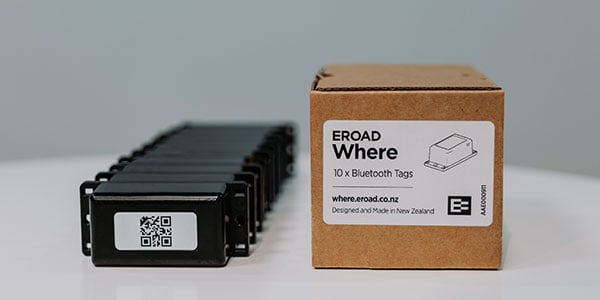
Bluetooth tags, picked up by the Ehubo2 from up to 70 metres away. Or Where mini - which pings from 25m away.
Etrack Where →Battery
The Oyster 3 runs on its own battery, so it reports on a schedule rather than all the time.
Driving accounts for 42% of work-related deaths in Australia, according to Safe Work Australia, and fatigue is a factor in 20% of fatal crashes. Your ute drivers aren't on regulated hours, but they still get tired. EROAD helps you spot fatigue and risky driving early, and gives you the footage and reports to coach your drivers.
Add a Clarity Edge AI dashcam and it watches for yawning and eyes that wander off the road. When it spots them, the driver hears a voice alert, and you're notified as well. Add Clarity Edge Fatigue for microsleep detection.
Clarity Edge →Road and cab on the same clip. Add cameras to side and rear for a fuller view of what happened. So after an incident there's footage to look at, not two stories to weigh up.
Clarity Multicam →Once a driver logs in, how they drive goes into their own safety report. So the conversation starts from that, not a hunch. Pair it with video footage for more effective coaching.
Driver safety →Vehicles working in high-risk situations, with dangerous gear - or simply drivers alone in remote areas. Get automated rollover alerts and emergency button installed so drivers can push it to start your emergency response. Satellite extends coverage beyond the mobile network.
Emergency response and lone workers →Clients want proof your crew was on site, and the tax office wants a logbook for vehicles that go home. EROAD keeps these records as your crews work, so they're ready when someone asks. Inspections and fatigue rules are usually your own policy, and Chain of Responsibility only applies if you use vehicles over 4.5 tonnes.
| Obligation | What's required | What EROAD records | Where you see it |
|---|---|---|---|
| Fringe benefits tax | What's requiredSeparate business running from private use for FBT calculation | What EROAD recordsBusiness or private, logged by the driver for each trip. Private mode stops location and behaviour being tracked when in use privately | Where you see it Fringe benefits tax FBT report and Private mode |
| Vehicle inspections | What's requiredPre-start and periodic checks, recorded and retrievable | What EROAD recordsChecklists kept against each vehicle and trailer, and faults reported to the workshop as they're found | Where you see it EROAD Inspect EROAD Inspect |
| Work completed | What's requiredProve when a vehicle or machine was on a site and what it did | What EROAD recordsArrival and departure against a geofenced site, run-time and distance logged | Where you see it Proof of service Geofence reports and Proof of Service |
| Fatigue policy | What's requiredHold drivers to your own rules on driving time and breaks | What EROAD recordsBreak reminders on the screen, and breaches logged. Not a regulated work diary | Where you see it Drive Buddy Fatigue Vehicle history, and the driver safety report |
| Chain of Responsibility | What's requiredIf you use vehicles over 4.5 tonnes, evidence of the reasonable steps you took on safety | What EROAD recordsEach vehicle's overspeed events and service history | Where you see it Chain of Responsibility MyEROAD reports and vehicle history |
| Site health & safety | What's requiredResponsible for safety of everyone on your sites including subcontractors | What EROAD recordsVirtual speed cameras monitor speed limit on site, geofence activity logs exits and entries | Where you see it Safety solutions Overspeed dashboard, geofence activity |
Find a tool by checking the map instead of ringing around the crews. When a client questions a site visit, you've got the record to answer it. And drivers who take a ute home can switch on Private mode for their personal trips.
Small tags for tools and GPS trackers for equipment - there's a range of size and power options to track your valuable equipment - and it all shows up on the map beside your vehicles.
Equipment tracking →Proof of Service puts each site visit on the record as it happens - with run-time, trips and distance - instead of on a sign-off sheet. And a client can log in and check it themselves.
Proof of Service →A mixed-use ute brings fringe benefits tax and privacy law with it. On a personal trip the driver switches on Private mode, and where they went and how they drove aren't tracked.
Private mode →Bluetooth tags on tools and test gear are picked up by any passing Ehubo2 within range - up to 70 metres for an Etrack Where tag, or 25 metres for a Where Mini — so instead of ringing around crews, you look up the last known location on the same map as your vehicles.
Yes, but not with EROAD Locate, which needs an OBD-II port to plug into. Plant and trailers without one are covered differently: Etrack G70 wires into the machine's own power, or Etrack Oyster 3 runs on its own battery.
Most ute drivers aren't covered by heavy vehicle driving-hours rules, but they still get tired on long days. Drive Buddy Fatigue lets you apply your own break and drive-time policy to every vehicle type, not just the ones regulation covers, with reminders shown in the cab. To go further, and monitor drivers for signs of fatigue you can add Clarity Edge and Clarity Edge fatigue cameras.
Yes. A subcontractor's vehicle or plant carrying an EROAD device reports into the same MyEROAD login as the rest of your fleet. EROAD Locate is ideal for subcontractor vehicles - it can be plugged into the OBD-II port - and easily transferred to another vehicle when the job's finished.
Yes. Draw the site as a geofence in MyEROAD, set its speed limit, and Virtual Speed Cameras flag any vehicle that goes over it inside that boundary.
Not much. A four-digit PIN starts the day, with a reminder if they forget. For a ute used privately as well as for work, the driver selects business or private per trip and switches on Private Mode for personal trips - messages from the office only open once the vehicle's stopped.
Tell us what your crews drive and carry, and what clients need you to prove. We'll show you how that looks in MyEROAD.